VAV Selection Revision Updates
Latest Releases
1. Corrected Issue with 8.5 KW Electric Heat on TVS units
2. Corrected issue with TVS with sizes 0404, 0504 and 0604
3. Removed the default check in the selection results to avoid confusion with multiple selections
4. Updated the grid to include more options to be updated with the Update Tag/Qty button
5. Made 20 ga standard on TVS units
6. Corrected issue with Poles and Contactors copying over to Cooling Only units
7. Added Electric Heat Amps to the selection results and reports
8. Add the fan CFM numbers to the order entry reports
9. Corrected pricing issues with 1” close cell foam
10. Change the default coil selection method to LAT
11. Increased the character limit on the BTUH
12. Added quantity and size to the first page of the pricing summary
13. Changed the program to require a transformer VA if a transformer is selected
14. Corrected issue with arrangement
15. Corrected quick ship issue with Analog Electronic controls.
16. Corrected fusing per step error on electric heat boxes
17. Updated the net add for factory consignment controls
18. Added the ability to select control enclosure on parallel boxes
19. Added ¾ closed cell foam to single duct units
20. Corrected quick ship issue with 3 and 4 row coils on 5 day
21. Eliminate the please wait screens between several clicks
22. Added quick ship to global
23. Added the ability to make projects active from the main projects screen
Revision Date: 13 August 2012
1. Corrected locked line issue
2. Moved the cursor to the tag field for all new selections
3. Added mount and wire options for the electronic field control on both the options tab and in global
4. Add quick ship option to global
5.
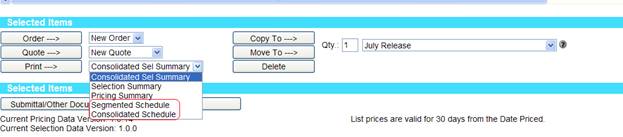
Added a new schedule option called Consolidated
Schedule that includes all models and heat types (dual duct will remain
separate) on one schedule. The Segmented
Schedule will provide the original program output. In addition, schedules can also be printed
from each model group when using the model group filter. 
6. Schedule options with the rest of the reports under the
Revision Date: 25 July 2012
1. Add secondary filters to allow them to see only coils that have reasonable secondary characteristics. This will eliminate coils with unreasonably low LWT’s, water flows, capacities, etc
2. Corrected the issue with Job Tags being cut off on order reports
3. Updated terminal strip offering
4. Added MBH to selection results for steam coils
5. Removed overhang on schedule export
Revision Date: 11 June 2012
1. Corrected Issue with quote totals
2. Corrected issue with tag order not matching display sequence
3. Updated tag groupings to show how many of each tag are included in the larger tag group
4. Added missing price for 1\2 closed cell foam
5. Corrected issue with tags on copied units
6. Corrected tag group sequence issue for order entry
7. Added the ability to have different multipliers for each model group
8. Added a confirmation for all deleted units
Revision Date: 19Apr2012
1. Modified all schedule reports to be sorting off of “Display Sequence”.
2. Modified order of Fan Powered liner options to have “Standard Fiberglass” first in the list.
Revision Date: 13Apr2012
1. 1. Allowed Airflow Switch field to be an available option on the Unit screen for Fan Power.
2. Added functionality to check Motor Voltage on Selection.
3. Modified “1”insul” to now be “spclinsul” and contain “1”Fiberglass” and “Standard Fiberglass” for Fan Power.
Revision Date: 10Apr2012
4. Eliminated unnecessary 3 phase options for Fan Power in Voltage/Phase dropdown
5. Removed auto-incrementing TagID’s for items moved/copied to different project schedules
6. Removed “VMA” from option on Options page
7. Added appropriate sound fields to Fan Power Selection Summary report
8. Updated data to allow HW to have rows available for Fan Power
9. Allowed 10 QS for 20ga when TSS
10. Added the Fan Curve onto Selection Summary report for Fan Power
Revision Date: 23Mar2012
11. Hid “MW Seimens AutoZero” option when the channel is FX.
12. Modified the reports to look at session for line ids rather than cookie.
13. Hid “Heating Air Temp” field, on Unit screen when Fan Power
14. Display two new fields “Primary Air Temp” and “Plenum Air Temp” on Unit Screen when Fan Power
Revision Date: 16Mar2012
1. Added SQs description to Selection Summary report.
2. Fixed error on Controller View Report, “Arrangement” column was throwing an error.
3. Fixed error on Options page, “Arrangement” field was not being updated properly when heat type was set to “None”.
4. Modified database to allow Steam with 2 rows for JCI channel.
5. Modified the copy feature to not auto-increment the first copied line item if moving to different project.
Revision Date: 07Mar2012
1. Modified Project Schedule grid to “Auto-Save” when jumping between line items while in Edit mode.
2. Added message to Controls page when no control sequence is selected.
3. Changed message for when options changed after running a selection and trying to save.
4. Modified pricing column header on Quote reports to “List Price”.
5. Modified link styling for “Ship Cycle” link on Unit Screen and “Pneumatic Controls Sequence(s) Matrix” link on Controls page.
Revision Date: 07Mar2012
1. Added “Pneumatic Controls Sequence(s) Matrix” link on the Controls page.
2. Added “View Ship Cycle” link to Submittal Options and Unit screens.
3. Expanded fuse dropdown to be able to see full description.
4. Changed the text that displays messages on the Project Schedule page.
a. Black text for normal messages
b. Red text for errors
5. Modified Heat CFM if greater than the Max CFM will be changed to the Max CFM value.
6. Changed if a user runs a selection and then changes the options before saving will message the user that values have been changed and will need to re-select.
Revision Date: 29Feb2012
1. Added note for control type “Pneumatic”, on the Controls screen.
2. Updated alert message for Global Options’ “Go Back” button.
3. Made a change to not allow heat type “Steam” for “TSL”
4. Added Control Sequence to Project Schedule grid for “Controller” view
Revision Date: 27Feb2012
1. On the Unit screen, possible selections grid is displayed for last valid selection.
2. Modified JCI “Submittal Documents” list on Submittal Options page
3. Fixed potential bug when running reports for 100+ boxes.
Revision Date: 23Feb2012
1. Transformer is automatically checked when Electric heat is selected.
2. Made changes to make Heat CFM get populated by Min CFM upon heat changing.
3. Copied “Arrangement” field to Options page.
4. Placed “Tag” field in “freeze” pane on Schedule grid.
5. Modified Control options, “Pneumatic” options now displayed with multi-selected list boxes.
6. Fixed exposed set point – contact factory message
7. Changed static override with inlet static on Global Options page.
8. Fixed “Qty” issue on Quote Pricing Summary report.
9. Added text definitions for octave bands on Sound page.
10. Set “Control Type” field to default to “JCI DDC” for JCI.
11. Update Quick Start Guide for JCI users.
12. Added “Actual WPD” to Project Schedule grid.
Revision Date: 15Feb2012
1. Add Tag field as part of Freeze pane on Project Schedule page.
2. Transformer is checked when factory transformer selected on Controls page.
3. Added Sound fields to Schedule, possible selections grid and schedule reports.
4. Fixed Glycol Pct display error.
Revision Date: 09Feb2012
1. Modified Pricing Summary report to be consolidated like the Order Entry Form reports.
2. Created Pricing Summary List report will be displayed with Pricing Summary reports.
3. Removed “Liner Options” field from Unit Screen.
4. Added focus to appropriate fields when changing “Method” field.
5. Changed “Max CFM” to “Max Design CFM”
6. Changed “Quantity” field to only allow numeric values.
7. Modified links on Submittal Options page to open in a new window.
8. Added sound fields to grid for Takeoff:Full view
9. Applied carry over sorting on Display Order from the Project Schedule grid to the Project Schedule reports grid
10. Fixed “magnifying glass” icon to display Selection Summary report in new window for that line item
11. Removed “Rep Account Number” from Cover Page on Submittal report.
12. Modified functionality on the Controls screen to allow users to select more than one control option for “Pneumatic” control type.
13. Fixed diagnostics to report when Control Sequence is not selected
14. Changed text for “ARI” to “AHRI” on the Sound screen.
15. Removed “Octave Band” headers for sound fields and added “Hz” values on Project Schedule grid, Possible Selections grid and all reports displaying schedule
16. Fixed error given for Contact Factory on Options page.
17. Changed to display “-“ on Project Schedule grid, Possible Selections grid and all reports displaying schedule when sound power values are below 15
18. Fixed the issue with the Possible Selections grid being cutoff during page scrolling.
19. Updated the drawing assignment application to allow drawings to be assigned via additional fields:
a. Heat Type
b. Control Type
c. Sound Attenuator
Revision Date: 02Feb2012
1. Hid features on Project Schedule page if in “No Project Mode”.
2. Modified back end of reports in efforts to increase speed.
3. Added note to bottom of all schedule reports and below possible selections grid on the Unit screen.
Revision Date: 30Jan2012
1. Modified data pulling in for field “Total APD” on all schedule reports.
2. Implemented changes to restrict Engineers from viewing Pricing and Quoting.
Revision Date: 27Jan2012
1. Modified Tag field on Unit and Schedule page to have endless amount of text.
2. Modified “Create Qty” field on Schedule page to not allow non numeric values.
3. Fixed issue of Attenuation Method to change when selection is ran.
4. Fixed Drawings issue on the Submittal report.
5. Fixed Sound values calculated by appropriate sound attenuator.
6. Added Help file link on Schedule page.
Revision Date: 26Jan2012
1. Modified “double wall” to be available for 5, 10, 15 day QS.
2. Disallowed the user of “(“, “)”, and “*” characters in the Tag fields on the Schedule and Unit page.
3. Added “Circuits” field on Water and Steam schedule reports
4. Added sound explanation note to all Schedule and Selection Summary reports
a. Added to Unit screen underneath possible selections grid
5. Modified “List $” to display just the list price and not list price * multiplier on the Quote Pricing Summary report
a. Fixes issues when multiplier is either 0 or empty
6. Fixed Auto tagging page, which now works
7. Changed “ARI” to “AHRI” for all grids
8. Changed the text of the “Submittal” button on the Project page to read “Submittals/Other Documents”
9. Removed steps from Cooling report on Quote Pricing Summary report
Revision Date: 24Jan2012
1. Modified option validation to not throw an error for 1” and ¾” Fiberglass when selecting 1/2” closed cell foam.
2. Updated reports/web screens to display raw sound power data (Possible selections grid, schedule reports, selection summary report).
3. Fixed issue to account for negative “Special” prices.
4. Added a check for IE7 on login of webselect.
5. Modified 20ga casing to be allowed for QS for only TSS models
Revision Date: 20Jan2012
1. Modified the project schedule and selection table.
a. Made sure all columns where center aligned.
b. Set widths for all columns to eliminate as much whitespace as possible.
2. Added a confirmation dialog if options were not applied on the Global Options page when the 'Return to Schedule' button is clicked.
3. Removed “.00” from price in selection grid.
4. Update project schedule reports to have report titles in all uppercase letters.
5. Fixed error when running a selection with “Capacity” and “Hot Water” heat type.
6. Fixed problem with having kW and Steps display on “Quote” report with a “Hot Water” line item.
7. Added $90 DDC Charge to Quotation report.
8. Integrating Fan Power JCI data and reports
Revision Date: 17Jan2012
1. Fully integrated JCI data for Single Duct.
2. Fixed Line Voltage and Phase to be populated before running selection.
3. Fixed issue with Steps displaying on Cooling Only report.
4. Labeled “Pneumatic & Analog Options” to “Pneumatic & Analog Control Options” on the Options page
5. Labeled “Mount & Wire, Field Options” to “Mount & Wire, Field Control Options” on the Options page
6. Modified “Pre-Order Checklist” text
7. Made a rule change on the way “contactor method” is set during selection
a. “nocontactor” will now be set to “1”, if “steps” is set to “modulating control” and “SSRsignal” is set to any value
8. Modified all Project Schedule reports to have column headers capitalized
9. Added the $90 Net Add to the Order Pricing Summary report
10. Modified the “Selection Summary” report to be able to display a detail report for each line item selected from the schedule
11. Fixed issue on “Pricing Summary” report to include “Transformer VA” for all heat types
12. Added the ability for 10 and 15 day QS for TSS
Revision Date: 11Jan2012
1. Changed the HTML layout for the Unit Selection page.
2. Global Options / Unit Options:
a. Moved secondary and primary fusing from Electric Heat to Unit section.
b. Mount and Wire, Field options are now shown for the following Control Types:
1. Mount & wire in factory
2. Field DDC
3. Pneumatic Field mounted controls
c. The following options are now set (if not already) when Transformer is checked:
1. Transformer Number: 1 transformer
2. Trans VA: 50 VA transformer
3. Added quantity to the Unit tab.
4. Wording of buttons that return to schedule was updated.
5. Provided guided navigational buttons on Unit, Sound, Controls and Options screen for the first added line item to the schedule.
6. Fixed Submittal report errors on the cover page and drawings
7. Modified the default options for “Transformer Number” and “Trans VA” when “Transformer” is selected to “1 transformer” and “50 VA transformer”.
a. If the values are modified before selection will not be overwritten by the default values.
8. Changed the “Project Schedule” print button from the Schedule screen to display in a new window.
9. Updated Order/Submittal reports to reflect new location of secondary and primary fusing options
10. Added the ability to run selection from Options page.
a. Removed the total price from Options page and now uses a “Validate Options” button to get the list price of options and errors
11. Made changes to clear all fields when changing heat types from “Electric”, “Water”, or “Steam” to “None”
12. Changed “Liner Options” to default to “1/2” Fiberglass” instead of “1” Fiberglass”
Revision Date: 04Jan2012
13. Copy feature will now auto-increment Tag from selected line item.
14. Allowed for easier exporting of Project Schedule reports to Excel.
Revision Date: 22Dec2011
15. Global Options Changes:
a. Added the ability to add Static for Sound Options.
b. Added control sequence filtering options to the control section.
c. Filtering now loads the first line item that meets the criteria.
d. Added price fields for Special Options.
16. Submittal Reporting Options
a. Moved “Project Schedule” report underneath “Submittal Drawings” options and renamed to “Submittal Documents”
b. The “Cover Page” option is now available to be “checked” or “unchecked”
c. Added LINKs to the right side of the page
17. Added option popup when adding a line item to an Order from the Project screen
18. Setup user defaults for VAV
19. Modified on Options page, “Special” text was changed to “Special(s)” and in front of the special prices “$” have been added.
20. For the Pricing Order Summary report, the grouping of the models now uses “TSS-EH, TSS-WC, TSS-SA-WC…etc” instead of “TSS-TSL”
21. Modified “Heating Air Flow” to not be overwritten by the “Min Primary Airflow” if is greater than zero.
22. Integrating JCI database into current reports.
Revision Date: 17Dec2011
1. Added “Pricing Summary Report”.
a. User can select the “Pricing Summary Report” and then click the “Print” button to view pricing summary before adding line item to an order.
2. Started integrating JCI database values with VAV project.
3. Added Fan Options and Arrangement to the Global Options.
Revision Date: 09Dec2011
4. Removed disabled top bar on Options, Controls, and Sound pages.
5. Heat type will now carry over to Controls page when Control Type is “Mount & Wire”.
a. Transformer checkbox will be checked when user selects “Transformer by ETI” for “Transformer options”
6. Continued speed improvements on Controls and Unit screens.
7. Enhanced functionality of Selection and Get Pricing.
8. Global Options functionality is complete.
Revision Date: 07Dec2011
1. Speed improvements on the Selection Screen.
2. Program Selects is available on the Schedule Grid and on the Selection Screen.
a. Both Rows and Ckts can be set to “Pgm Select”.
b. Schedule Grid returns the first valid Rows-Ckts selection.
c. Selection Screen displays all valid Rows-Ckts selections.
3. The Controls section of the Selection Screen has been redesigned to improve speed and usability.
4. The initial release of Global Options has been added.
a. Not yet fully functional.
Revision Date: 01Dec2011
1. Electric heat pricing issue has been resolved.
2. Quotes naming issue has been resolved.
a. Project names ending in numbers caused issue.
i. “Project1” had quotes named “Project2”, “Project3”, etc.
ii. “Project1” now names quotes “Project1.00”, “Project1.01”, etc.
3. Submittal Report Issue has been resolved.
4. Sound method descriptions updated.
a. “Default” modified to “Default (AHRI-885)”.
b. “ARI-885” removed form list.
5. Scroll bar on sound method description does not appear unless required.
6. Typo in AHRI-885 method description has been corrected.
7. Entering Selection Page while grid in edit mode issue has been resolved.
a. Any changes made to grid columns are now saved to the line item.
8. Arrangement default has been added.
a. 1st line item in a project defaults to “1 - LH Controls / LH Coil” during selection process.
9. Disabled field colors have been enhanced.
a. Gray background with light gray text
10. When selecting for “All Sizes”, only valid possible selections are shown.
a. Diagnostics list reasons for invalid selections.
11. All radiated and discharge sound dB values are now shown.
12. Electric Heat fusing defaults to “No Fusing unless >/=to 48 Amps per NEC”.
13. Hot Water coil max WPD now defaults to 10.00.
14. BTU values are formatted to use commas.